
Zephyrus
Showing all 2 results
-
Asus, Laptop Battery, Zephyrus
C41N1837, 0B200-03380100 Laptop internal battery for ASUS ROG Zephyrus G15 GA501I GA502 GU502DU GX502GW GX532GV GU532GW GA502DU series
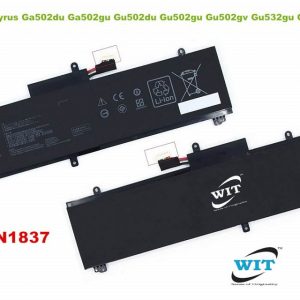 Asus, Laptop Battery, Zephyrus
C41N1837, 0B200-03380100 Laptop internal battery for ASUS ROG Zephyrus G15 GA501I GA502 GU502DU GX502GW GX532GV GU532GW GA502DU series
Technical Specifications
- Brand : ASUS
- Suitable Model : ASUS ROG Zephyrus G15 GA501I GA502 GU502DU GX502GW GX532GV GU532GW GA502DU series
- Battery Part Number: C41N1837, 0B200-03380100
- Cell Chemistry : Lithium Polymer( Li-Polymer)
- Backup time : Depends on your consumption and usages.
- Life cycles : 500+ Times
- Product Condition : Brand new & Original (Real capacity, high quality cells, longer life cycles, convenient to use)
- Safeguard : Against incorrect voltage, short circuit, internal overheating.
- Warranty: 06 Months(180 days)
Note:
1. The first use of the battery, the battery voltage may be too low, you need to recharge the standby 06 to 08 hours before normal use.
2. First of all you should use the original AC Adapter/Charger in your laptop. Otherwise, WIT is not liable for any kind of damages.*** Attention:
- To avoid wrong order placed or wrong item you bought, please check out the battery image, Model/Type/Part/Product Number, connector, etc. with your existing battery , carefully before ordering.
- Please compare with your original battery before purchase , to make sure you have choose the correct battery model .
- Before placing your order, Please refer to the picture and check it. Because the products produced by different factories will have differences.
- Please read the battery manual carefully before installing the battery; If the battery is going to be stored for a long time (more than 3 months), it must be charged over 80%, it must be stored in a dry environment with a temperature range of 10-35 Celsius degree, avoid exposure to the sunlight; Don’t disassemble & crush , don’t pierce the battery with any sharp knife.
- If the new battery is not recognized during the initial installation, please reinstall and check if the interface is fully connected. Discharge the new battery to 5% (not 0%), then charge and cycle 3-4 times to wake up the new battery.
SKU: WIT11084 -
Asus, Laptop Battery, Zephyrus
C41N1906, C41N1906-3 (Short Cable), 0B200-03590000, 0B200-03590100 Laptop internal Battery for Asus ROG Zephyrus Duo 15 laptop series, ROG Zephyrus Duo 15 GX550, ROG Zephyrus Duo 15 SE(GX551) series
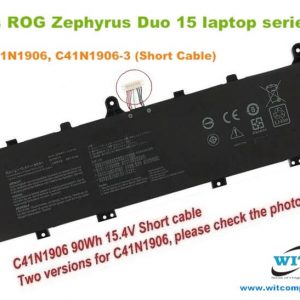 Asus, Laptop Battery, Zephyrus
C41N1906, C41N1906-3 (Short Cable), 0B200-03590000, 0B200-03590100 Laptop internal Battery for Asus ROG Zephyrus Duo 15 laptop series, ROG Zephyrus Duo 15 GX550, ROG Zephyrus Duo 15 SE(GX551) series
Technical Specifications
- Brand : Asus
- Suitable Model : Asus ROG Zephyrus Duo 15 laptop series, ROG Zephyrus Duo 15 GX550, ROG Zephyrus Duo 15 SE(GX551) series
- Battery Part Number: C41N1906/C41N1906-3, B200-03590000, B0B200-03620000, 4ICP5/63/133 (Short Line)
- Cell Chemistry : Lithium-Polymer
- Backup time : Depends on your consumption and usages.
- Life cycles : 500+ Times
- Product Condition : Brand new & Original (Real capacity, high quality cells, longer life cycles, convenient to use)
- Safeguard : Against incorrect voltage, short circuit, internal overheating.
- Warranty: 06 Months/180 days
Note:
1. The first use of the battery, the battery voltage may be too low, you need to recharge the standby 06 to 08 hours before normal use.
2. First of all you should use the original AC Adapter/Charger in your laptop. Otherwise, WIT is not liable for any kind of damages.*** Attention:
- To avoid wrong order placed or wrong item you bought, please check out the battery image, Model/Type/Part/Product Number, connector, etc. with your existing battery , carefully before ordering.
- Please compare with your original battery before purchase , to make sure you have choose the correct battery model .
- Before placing your order, Please refer to the picture and check it. Because the products produced by different factories will have differences.
- Please read the battery manual carefully before installing the battery; If the battery is going to be stored for a long time (more than 3 months), it must be charged over 80%, it must be stored in a dry environment with a temperature range of 10-35 Celsius degree, avoid exposure to the sunlight; Don’t disassemble & crush , don’t pierce the battery with any sharp knife.
- If the new battery is not recognized during the initial installation, please reinstall and check if the interface is fully connected. Discharge the new battery to 5% (not 0%), then charge and cycle 3-4 times to wake up the new battery.
SKU: WIT13085